Fix My Speaker
using powerful speaker dust cleaning sound to restore clear audio.
Muffled, unclear, or irregular sound/voice creates irritation for the listener! Am I right? It’s all due to moisture, dust, lint, and small sand particles that get stuck in your phone speaker grill. This makes every phone call frustrating and every video or voice note hard to understand. If you also face this issue, don’t worry – check this out!
Before getting professional help, there is a free solution here. Try the “Speaker Cleaner” tool that is especially designed to eject water, dust, and all unwanted stuff to make the sound clear, regular, and sharp. It can also be used to boost your speaker volume, test the health of your speaker in just a few seconds.

If water get inside your phone speaker, take it serious to troubleshoot the issue immediately. As long as moisture remain inside there is a risk of permanent speaker damage, or phone failure due to starting corrosion in internal sensitive components. in case of phone failure You can lose your important data that is stored in your phone.
What is speaker cleaner?
Speaker cleaner is a web-based online tool that having features to remove tiny dust particles, water droplets, and debris from your phone speaker and restore the sound quality. It is an easy and safe option for users facing muffled or distorted audio without needing any physical tools.
No download, no signup, no installation is require to remove dust through it. No chances of harm to any device as it is based on simple sound waves that force the speaker to vibrate and to remove dust and moisture.
How Does Speaker Cleaner Work?
The Working Principle of a speaker cleaner is based on sound vibration. When someone presses “speaker cleaner” button, it plays a specific sound at high frequency. These sound waves cause to rapidly vibrate the speaker’s diaphragm. A continuously shaking speaker put a force on dust particles to get them out or break the surface tension of water droplets to make the speaker moisture-free or dust-free.
How to use Speaker cleaner?

Step 01
Use a trusted web-based solution to fix your phone speaker

Step 01
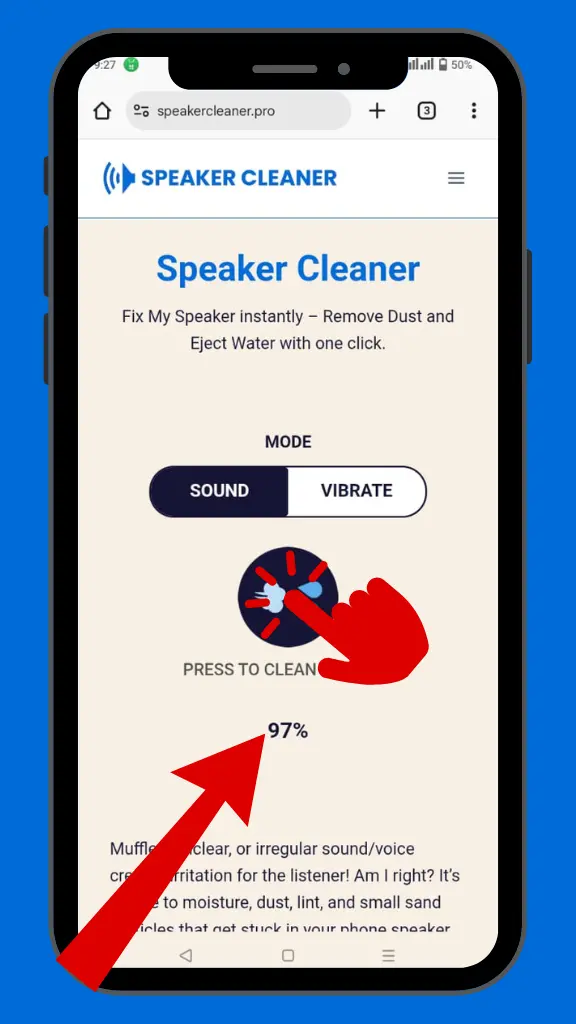
Select the “Sound Mode” and set your device volume to maximum
Step 01
Tap “Speaker Cleaner” and let the progress bar reach 100%.
Step 01
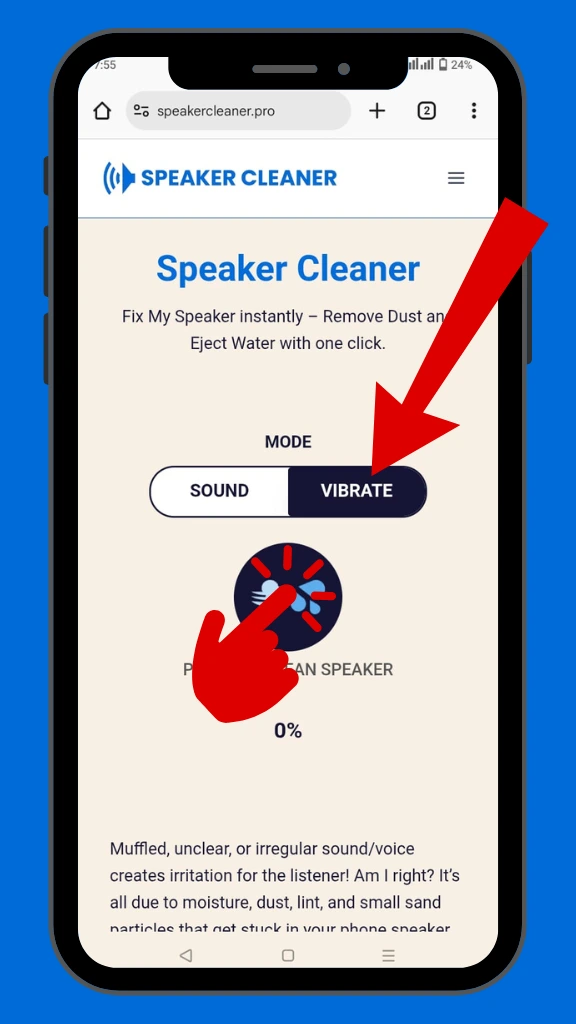
Select “”vibrate Mode” and press speaker cleaner button
What are the features of Speaker cleaner?
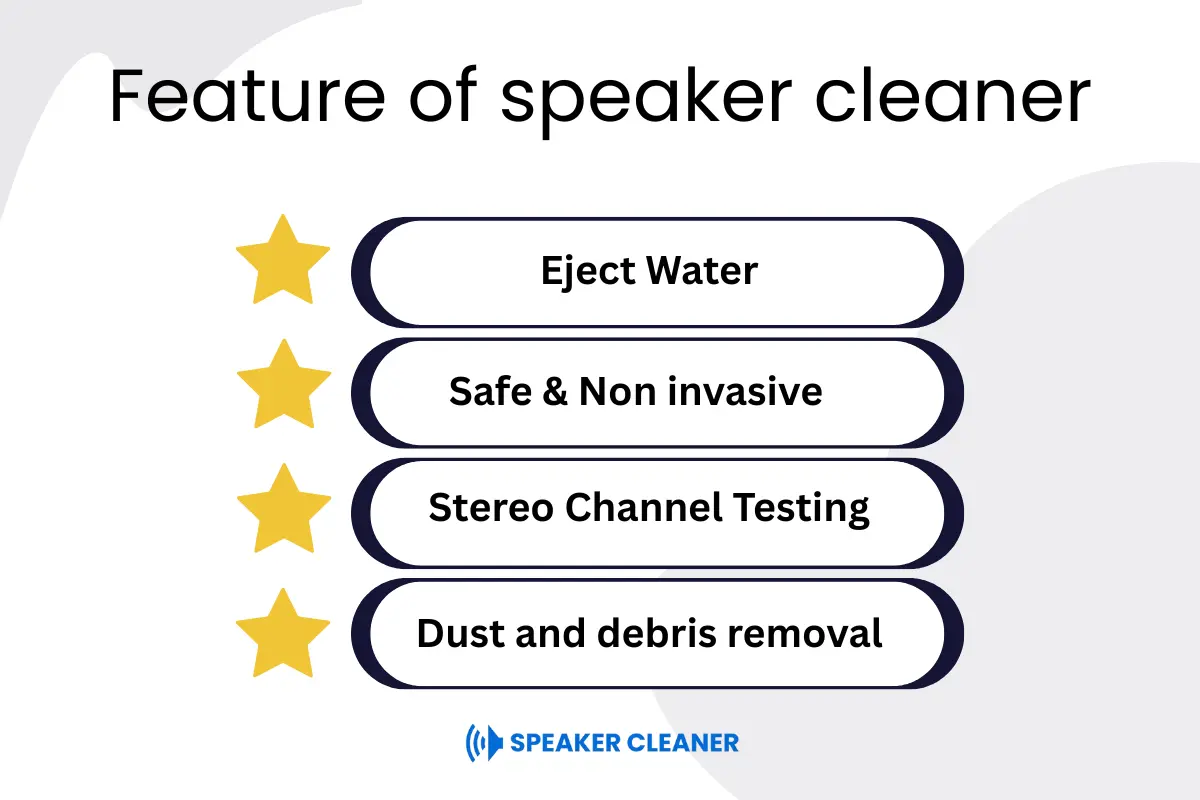
Speaker cleaner is used to enhance the overall performance of the speaker. It is packed with advanced features to restore the overall sound quality and make your voice more clear.
Eject Water:
This is the most important feature. Low frequency sound waves shake the speaker diaphragm and break the surface tension of water droplets. Continuously pressure of sound waves forces the water to drop out from the speaker grill.
Dust and debris removal:
If dust and sand particles are stuck in your phone speaker it causes low volume and distortion. You can boost the speaker volume and make the sound regular by making the sand out of the speaker just by using a speaker cleaner tool.
Multiple Sound Frequencies:
The tool is enriched with multiple sound waves to maximize the chances of moisture and dust removal. This feature makes the tool more perfect to tackle all types of blockages.
Stereo Channel Testing:
By using this tool you can check the balance of left and right speakers by playing sound from each side separately. You can know whether both sides of the speaker are working properly or not.
Safe & Non invasive:
This is safe for all devices as no signup or no download is needed. It is a web-based easy to use tool. Just open it from your browser and press the button to restore sound quality.
What are the benefits of speaker cleaner?
Restore Sound Quality:
If the water, sand or dust is stuck in your phone speaker it will decrease the volume and make the sound muffled. By using a speaker cleaner tool you can restore the original sound quality of speaker.
Saves Repair Costs:
If there is dust and moisture in a minor quantity in your speakers and sound becomes muffled, you don’t need to spend money in replacing hardware. You can restore your speaker sound by using a speaker cleaner tool.
Easy to use:
You can start the cleaning process with a single tap. No technical knowledge is needed.
Compatibility:
Speaker cleaner is highly compatible for all devices. You can run it on android, iPhone, laptop, EarPods and all other devices without any restriction and barrier.
Prevent long term speaker damage:
If there is moisture in your phone speaker, it causes corrosion. It will damage the internal components of the speaker. By using a speaker cleaner you can remove all the moisture and protect the speaker from permanent damage.
What makes us different from other speaker cleaning tools?
Multiple tools are available on play store for speaker cleaning purpose. I will compare them with speaker cleaner tool in terms of features, compatibility, price and much more. At the end of the section you will be able to clearly differentiate.
| Features | Speaker cleaner | Other Tools |
|---|---|---|
| Mode Of working | Sound + Vibration | Usually Vibrations |
| Dust Cleaning | Advance | Limited |
| Download Require | Web Based | Often require Installation |
| Cost | Free | Ads |
| User Friendly | Easy ton use | Usually Confusing |
| Sound Test | Available | Usually Not Available |
| Compatibility | Android, iPhone, Laptop, EarPods, etc. | Usually for android and iPhone |
| Signup | Not Needed | Usually Required |
Does Speaker cleaner Work?
In most cases the answer is yes. You can check the feedback of users to understand the effectiveness. But that’s not enough! After getting experience in using speaker cleaner on a lot of water damaged speakers I am going to tell you how effective it is.
It totally depends on the amount of moisture, type of dust, type of device and the device’s ability to resist water.
Amount of Moisture:
If your phone is exposed in a light moisture that slightly changes the sound can be troubleshooted easily with a speaker cleaner. If your phone accidentally dropped in heavy water then it’s time to get professional help.
Type of dust:
If light dust or debris is stuck in the speaker it can be rescued with a speaker cleaner to make the sound regular and clear but if there is heavy dust blockage, the speaker will not recover with sound waves.
Device Type:
Speaker cleaner is highly compatible for all devices. But ideal for small speakers like smart phones, laptops and bluetooth speakers. If you try it on bigger speakers sound waves will not be enough to shake the bigger diaphragm of the speaker.
Device water resistance ability:
If your phone has good water resistance, the chances of internal damage are lower and speaker cleaner works more effectively. But if the phone doesn’t have any water protection or is already damaged from moisture, the results may vary.
Why Do You Need To Clean Your Speaker From Dust & Water?
Speakers can get blocked by dust or damaged by water
You can experience poor sound, distorted audio, or even complete failure . Regular cleaning helps keep your speaker loud, clear, and safe. Here’s why it’s important.
Improve Sound Quality:
Sticking Dust and debris inside the speaker grill can be removed with a speaker cleaner.
Prevent water Damage:
Humidity and moisture can be removed with speaker cleaner to prevent damage.
Avoid long term Damage:
Chances of corrosion can be minimized to avoid any big loss.
Avoid Costly Repairs:
Before getting professional help try the tool to save money.
What’s the science behind speaker cleaner sound Wave technology?
The technology behind speaker cleaner sound waves is to create a shaking effect. This effect is very beneficial for dust or water removal from speakers without physically opening the phone.
What are sound waves:
Sound waves are actually vibrations that travel through the speaker and create shaking in the speaker diaphragm.
Effect on water:
Shaking effect break the surface tension of water molecules and force them to out from speaker grill
Effect on Dust:
Tiny dust particles start to vibrate with sound and move out of the speaker.
Speaker Cleaning Methods Dust Vs Water
When it comes about cleaning the speaker, two factors are involved – the sand and water. Dust can decrease the volume, make the sound muffled, and unclarity in voice during phone calls and listening music.
Moisture can damage the entire speaker or can cause permanent speaker damage over time due to corrosion.
What are common methods to clean speakers?
There are different methods that can be used to clean your speaker and restore the sound again. Here I will discuss some important speaker cleaning methods:
Rice Method:
Turn off the device:
Dry all the moisture speaker and entire body of the phone to minimize the chances of permanent speaker damage.
Uncooked Rice Container:
Fill a container with uncooked rice, place the phone in the center or make sure that there is no edge of the phone that is not covered by rice. Seal the container to make it air tight.
Wait gently:
Leave the phone in the container for up to 24 hours. This time period depends on the amount of water that is entered.
Clean your Phone:
open the seal of the container and take out the phone from rice. Dry it with a soft or clean piece of cotton to remove rice dust from the body and grill of the speaker.
Test:
Test the speaker performance by playing an audio or video file, if still muffled then you can get professional help.
Silica Gel Method:
Silica gel packets are very famous to absorb moisture. These packets are usually used in shoe boxes and boxes of electronic appliances.
Turn off the Device:
After taking the device from water, turn it off and dry it with soft clean cloth to remove tiny water droplets from the entire body.
Silica gel packets:
Take a small container and fill it with silica gel packets. Put the phone in the center of that container by making sure the phone is fully covered with silica gel from all sides. Make the container air tight. Silica gel will absorb moisture.
Wait gently:
Leave the phone in silica gel container for up to 24 hours. The more time you will provide , the better will be the results.
Dry and Test:
Take the phone out, clean it with soft tissue and test the speaker by playing any media file. If the issue is not resolved then it’s time to get professional help.
Other Methods
If these don’t work there are also some more famous traditional techniques to clean your speaker, you can try one of them.
Dry Cloth:
Hold the phone in your hand, shake it slightly, keeping the speaker side down. Take a small piece of soft, dry cloth. Wipe the speaker grill and surroundings to remove debris and sand particles.
Compressed Air Burst:
To remove dust, use an air blower to blow short bursts into speaker holes through the grill. Make sure you don’t use it for a long duration, as excessive air may push dust deeper into the speaker.
Soft Brush:
A toothbrush can be used to loosen the dust particles and lift them from the speaker grill. Avoid applying more pressure on the grill as it can be damaged because it is usually made up of sensitive material.
Vacuum Suction:
Use a mini vacuum on a low setting to suck out dust and debris from the speaker area. Avoid high power to prevent damage to delicate components.
Sticky Tape:
Take a lead pencil, wrap a piece of tape around the tip, keeping the sticky side out, and press it on the speaker hole. The tape picks up light dust particles without damaging the grill
Toothpick or Needle:
Insert the tip of the toothpick or needle into the speaker hole to remove dust or debris from the speaker. Complete this procedure very slowly and carefully to avoid damaging the speaker grill
What type of problems does speaker cleaner solve:
Speaker Cleaner is designed to fix audio issues caused by water, dust, and debris. It works best for minor speaker blockages and helps restore sound clarity without any physical tools.
Dust Build-Up:
Over time, dust and tiny particles can block your speaker and muffle sound. Speaker cleaner clears them using sound vibrations.
Water in speaker:
Water trapped inside the speaker can distort audio. This tool helps push water out with powerful sound waves.
Low Volume:
When the dust or debris builds up in the speaker, it may partially or completely block the speaker. That’s why you can experience less volume, but don’t worry, use speaker cleaner to clear all blockages.
Distortion in sound:
Distortion in sound is often a result of fine dust that is trapped inside the speaker. Speaker cleaner helps to remove dust from the speaker and make the sound clear.
Crackling:
Speakers crackle when something blocks the sound inside. Speaker cleaner sends out sound pulses to clear the way and stop the crackling.
Rough or Unpleasant Sound
If your speaker sounds rough, muffled, or irregular, it could be due to dust, moisture, or other tiny unwanted particles inside the speaker. Speaker cleaner is a lifesaver in this situation as it can restore original sound again through sound waves.
Buzzing Noise:
Buzzing sounds from your speaker can be caused by tiny particles or moisture interfering with the sound. Speaker cleaner uses vibration to clear these blockages and reduce the annoying buzz.
What to do if a phone accidentally falls in water?
Whether your phone was exposed to rain or dropped in water, you can prevent permanent damage by taking some steps quickly. Below are effective and practical ways that can be used to remove water from phone speakers.
Turn off instantly:
Take the phone out of the water and turn off instantly, to avoid any electrical damage. Water can go inside internal components and there is risk of short circuit or phone failure.
Wipe with dry cotton:
Use dry, soft fabric cotton to wipe any remaining water droplet from the entire body of the phone. Pay attention to headphone plugin area, or charging port of mobile phones. Don’t apply excessive pressure as lint of cotton can get trapped inside sensitive ports.
Shake the Phone:
Hold the phone firmly with the speaker grill facing downward, shake it gently. There are chances of removal of trapped water due to the gravity effect. Keep a cloth under the phone while doing this process to avoid accidentally falling off the phone.
Use Speaker Cleaner tool:
Open “Fix My Speaker” on your phone, maximize the volume and press the water eject button. Sound vibration will shake the speaker of the phone for effective removal of dust and moisture. Repeat the process if needed.
Use Silica gel:
Silica gel is famous due to its moisture absorption properties. Take a container, fill it with packets of silica gel, put the phone in the center of the container, and make it air tight. Open it after 24 hours to give maximum time to absorb moisture.
Test the Phone:
Run an audio file on your phone to check the performance of the speaker. If the issue is not resolved even after applying all methods, there are chances of hardware damage. It’s better to get professional help.
Speaker Water Damage: Common Myths and Real Facts
Myths
Rice will fix the water damage:
People usually think that uncooked rice can absorb moisture, but the fact is that rice doesn’t extract water from deep within your phone or speaker components. Although dust from rice trapped in the speaker grill causes further speaker damage.
Rapid Heating Is the Fastest Way to Dry It:
Many people believe that with a hair dryer, a heat gun, placing the phone in the sunshine, or next to the heater will dry out the water from speakers. But this method can do more harm than good. Hot air can drive water deeper into internal circuits and components.
Facts
Silica gel is more effective than rice:
Silica gel can absorb more moisture from the roots, as compared to rice. Therefore, when it comes to handling a water-damaged phone, silica gel is better. It acts faster and more efficiently to dry internal sensitive components of the speaker, making it moisture-free.
Sound Vibrations actually work:
High to low frequency sound waves, like those used in tools such as “Fix My Speaker,” can help to dry water from the speaker grill without opening the device. It’s a safe first step before trying physical drying methods.
Professional help is a safe choice:
If the sound of your speaker is distorted or completely silent, it’s better to consult a technician. The expert will safely inspect the internal components, remove corrosion, and prevent further damage.
DIY vs. Professional Speaker Repair: What’s Right for You?
Not all speaker issues are fixed in a repair shop. In many cases, minor problems can be handled at home with the right tools and care. In this section, I will highlight some signs of damaged speakers. Based on these signs you can decide whether it can be repaired at home or requires a professional technician to fix the issue.
✅ When DIY Repair is a Good Option
Muffled or low audio:
If your speaker sounds muffled, unclear, or completely quiet, a DIY solution may work. You can try solutions like sound-based, silica gel, and vacuum suction to remove dust and moisture.
No visible damage:
If there’s no rust, corrosion, or physical damage to your device, you can safely try simple fixes at home.
Light moisture in the speaker
If you think that a light amount of water splashes fell on your phone and slight dust is in the speaker, you can go with a sound-based solution
🚫 When to Call a Professional
Complete speaker failure:
If there is no sound coming from the speaker even after drying or cleaning, the internal hardware might be damaged and needs expert attention.
Phone Fell in Water:
If your device was completely underwater, it’s best to avoid DIY methods and get help from a professional to prevent serious damage.
Burning Smell:
If your phone smells like something is burning, it could be a serious problem inside. Maybe like short circuit, battery swelling, or damage to the motherboard. Don’t try to fix it yourself; it’s better to take it to a professional right away.
Your device is under warranty:
If your phone is still under the warranty period, avoid DIY techniques; instead, contact the official service center or authorized technician for proper support.
Final Thought:
I have done my best to cover all the possible methods and techniques that can be used to fix a water or dust-damaged phone. After personally using the speaker cleaner tool on several devices, here’s what I have learned:
“If your phone’s sound is muffled or unclear due to light dust or moisture, try “speaker cleaner tool before spending money on professional repair! In many cases, it can fix the issue quickly and effectively.”